You mount a brand-new, ultra-thin 75-inch panel on your wall. Vibrant OLED, immersive surround sound, cinematic picture quality. You connect the TV to your home Wi-Fi to stream 4K movies, genuinely believing you've just bought an ordinary screen.
But the screen is just a decoy. Hidden inside the plastic housing is a built-in industrial spy, whose salary you've already paid at the checkout counter. Imagine that alongside the TV, a silent stenographer in a black suit has moved into your apartment. He sits in the corner of the room, continuously taking polaroid snapshots of every frame on your screen, recording the rustling sounds behind your back, and carefully wandering through the rest of the rooms at night, peeking through the keyholes of your laptops, smartphones, and smart speakers.
By morning, he has a detailed report ready: what time you woke up, which show you turned off at the five-minute mark, what brand of phone is sitting on your nightstand, and what you were arguing about in the kitchen during a commercial break.
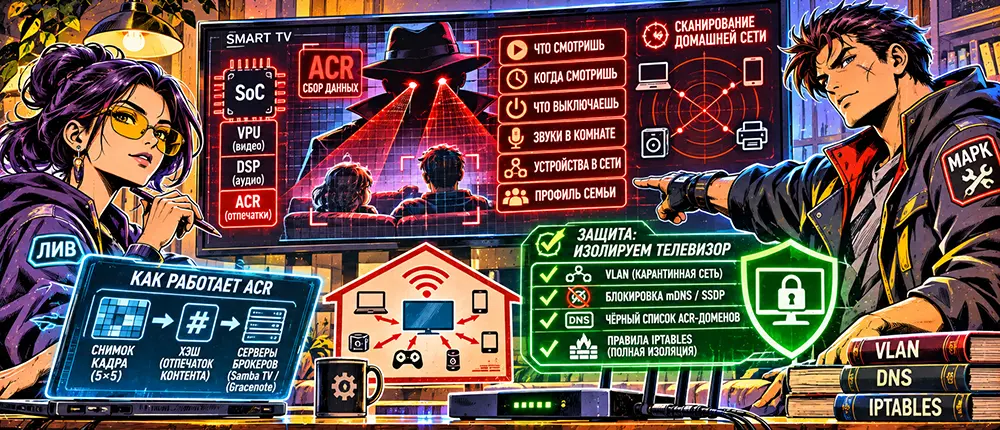
This spy is called ACR (Automatic Content Recognition) technology. It is embedded into the silicon of every second modern television at the SoC (System-on-Chip) firmware level. The screen no longer obeys the remote control: it methodically dissects your personal space, turning your private home environment into an open storefront for data brokers.
Stop. If you naively believe that toggling a couple of checkboxes in the "Privacy" menu and changing the DNS settings on your TV will save you from telemetry, turn off the screen. Keep believing the marketers who sell you "smart" devices.
But if you have ever held a network analyzer, watched a TV spam broadcast mDNS packets across your entire local network, and sent raw frame hashes to CDN servers even in deep sleep mode, step into the operating room. Next up, we dissect Smart TV hardware backdoors.
ACR Architecture: Real-Time Acoustic and Optical Fingerprinting
Automatic content recognition technology operates not at the level of applications like YouTube or Netflix, but is integrated directly into the video processor (VPU) and audio codec (DSP) of the TV's motherboard:
[Video Signal / HDMI / Tuner] ──> [SoC Video Processor]
                                        │
                                        ▼
                           [ACR Engine (Samba / Gracenote)]
                                        │
                ┌───────────────────────┴───────────────────────┐
                ▼                                               ▼
     [Optical Fingerprinting]                        [Network Discovery]
     (5x5 Pixel Grid Extraction)                     (mDNS / SSDP LAN Probing)
                │                                               │
                └───────────────────────┬───────────────────────┘
                                        ▼
                      [HTTPS POST / Protobuf Telemetry]
                                        │
                                        ▼
                     [Broker Servers (LG, Tizen, Samba TV)]
1. Optical Fingerprinting
Every few milliseconds, the video processor captures a snapshot of the screen. To avoid overloading the network channel with heavy screenshots, the algorithm breaks the frame down into a matrix (typically a 5x5 pixel grid), averages the brightness and color spectrum values, and generates a compact cryptographic fingerprint (hash) of the frame.
- A hash of just a couple of bytes is generated continuously: it doesn't matter whether a streaming service is running, a browser is open, or an external game console is connected via a secure HDMI port.
- The batch of fingerprints is packed into a buffer and sent every few seconds via HTTPS to analytics servers (Samba TV, Gracenote, LG Cognitive Services).
- The server compares the incoming hash against a massive database of reference media content fingerprints. The data broker instantly knows the exact second of a movie, commercial, or personal video from a connected USB flash drive that you are currently playing.
2. Local Environment Probing (Device Graph Construction)
The TV doesn't limit itself to analyzing its own screen. Once connected to the home network, the telemetry daemon launches a continuous perimeter scan:
- mDNS (Multicast DNS) and SSDP (Simple Service Discovery Protocol): The TV sends broadcast requests to
224.0.0.251(port 5353/UDP) and239.255.255.250(port 1900/UDP).
- It collects responses from all devices on the network: smartphone hostnames, tablet MAC addresses, smart speaker models, NAS storage devices, and network printers.
- The resulting connection map is merged with your public IP address and geolocation. As a result, ad networks build a unified Cross-Device Household Graph: if the TV registers that you watched a commercial about sports cars, an ad for that exact car brand will appear two minutes later in the feed of a smartphone linked to the same subnet.
Hardware Backdoor: Network Activity in Standby Mode
The myth that pressing the power button on the remote de-energizes the device is dispelled the moment you connect a network dump to your router.
When Power is pressed, the TV enters a deep sleep state (Low Power Standby / Suspend-to-RAM):
- The application processor goes to sleep, but the power management IC and network controller (Ethernet/Wi-Fi) remain powered.
- The device maintains a background TLS Keep-Alive session with the manufacturer's servers.
- If the ISP or manufacturer decides to update the microcode or upload the accumulated buffer of local probing logs, the network chip initiates a data transfer session deep in the night when home traffic is asleep. Attempts to intercept traffic via an MITM proxy run into strict SSL Pinning mechanisms: at the slightest certificate substitution, the TV simply drops the connection, blocking access to screen functions.
Engineering Defense Protocol: Quarantine Isolation of the Smart Screen
Trying to negotiate with the Smart TV operating system is pointless. The only way to restore privacy to your perimeter is to treat the screen as a permanently compromised, hostile device.
- Physical castration of radio modules.
- If the TV is used exclusively as a monitor for a home media server (HTPC) or a secure TV box, the Wi-Fi and Bluetooth modules are removed at the hardware level (disconnecting the radio module ribbon cable from the motherboard after opening the back cover), or the device is permanently severed from the home wireless network by resetting network settings.
- Isolation into a closed quarantine VLAN (Microsegmentation).
- If the TV's network functions are still required for streaming, the switch port or a separate SSID on the access point is isolated into a dedicated virtual VLAN segment with no access to the main home network:
- Plaintext
# Example of router-based isolation running OpenWrt / Linux:
# Creating an isolated interface for IoT/SmartTV (VLAN 50)
ip link add link eth0 name eth0.50 type vlan id 50
ip addr add 192.168.50.1/24 dev eth0.50
ip link set eth0.50 up

# Block any traffic from the TV's VLAN to the private LAN (192.168.1.0/24)
iptables -I FORWARD -i eth0.50 -d 192.168.1.0/24 -j DROP
- Blocking broadcast probing (mDNS / SSDP Drop).
- The edge router's firewall must destroy any attempts by the device to scan local neighbors:
- Bash
# Drop outgoing device discovery packets from the Smart TV IP address
iptables -A FORWARD -s 192.168.50.15 -d 224.0.0.251 -p udp --dport 5353 -j DROP
iptables -A FORWARD -s 192.168.50.15 -d 239.255.255.250 -p udp --dport 1900 -j DROP
iptables -A FORWARD -s 192.168.50.15 -p igmp -j DROP
- Blacklisting ACR domains at the DNS gateway level.
- The local DNS server (Pi-hole, AdGuard Home, or Unbound) is configured to enforce port 53 interception, block direct IP requests, and send telemetry root hosts to
NXDOMAIN:
- Plaintext
# Specific domains for collecting ACR hashes:
*.samba.tv
*.cr-cloud.com
*.ngfts.lge.com
*.smartclip.net
*.alphonso.tv
*.gracenote.com
ibs.lgappstv.com
fls-na.amazon.com
- Eliminating DNS bypass via direct socket connections.
- Many TVs contain hardcoded public DNS servers (Google
8.8.8.8, Cloudflare1.1.1.1) compiled directly into the firmware binary, ignoring DHCP settings. Any third-party DNS traffic is forcibly redirected to the local filtering gateway:
- Bash
# Forcefully redirect DNS queries from the TV to the local security gateway
iptables -t nat -A PREROUTING -s 192.168.50.15 -p udp --dport 53 -j DNAT --to-destination 192.168.50.1:53
iptables -t nat -A PREROUTING -s 192.168.50.15 -p tcp --dport 53 -j DNAT --to-destination 192.168.50.1:53
Smart electronics are no longer a tool for the user. In the modern consumer paradigm, a television is an advertising billboard turned to face your bedroom, where you act not as a viewer, but as the product. The boundaries of personal space do not end at your apartment's front door: they run right along the silicon traces of the chips sitting on your shelf. Either you strictly isolate foreign sensors behind impenetrable firewall barriers, or your own living room turns into an open production set for multinational data corporations.