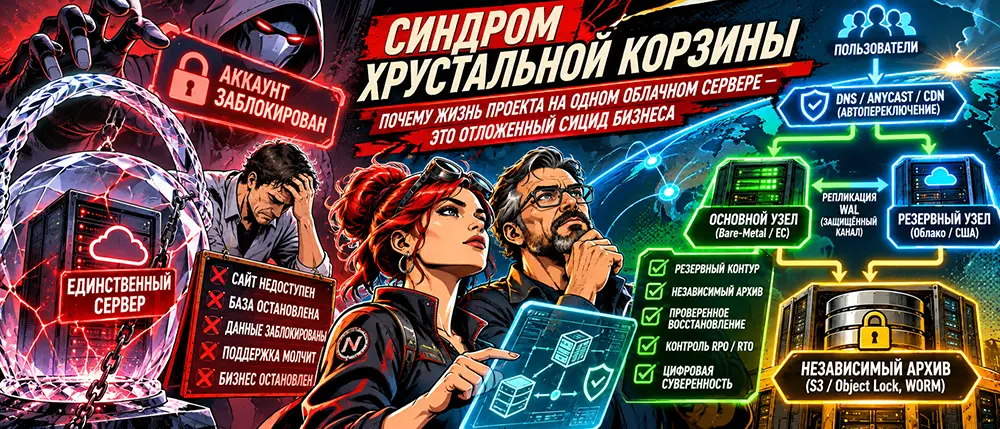
How a single suspension can shut down an entire company, why a second server doesn't automatically mean security, and what digital independence actually requires.
A joint article by Liv and Zhora
The Restaurant with Its Door Taken Away
Imagine you’ve opened a restaurant in a huge shopping mall.
Marble floors, panoramic windows, a beautiful sign. Every table is booked in the evenings. Suppliers bring in produce, accounting counts the revenue, and the kitchen staff works non-stop.
The business is growing.
Yet there is one feature you fail to notice.
The kitchen, storage room, accounting office, cash server, safe, and electrical panel are all located in a single back room. And the only key to it belongs to the mall administration.
One morning, the corporate security system detects a discrepancy in the tenant's payment documents.
An automatic lockout triggers.
The security shutters roll down. The cooks cannot enter the kitchen. Customers stand outside the closed entrance. Suppliers turn their trucks around.
You call support.
A robot informs you that your ticket has been registered.
An hour later, it repeats the exact same thing.
A day later, still the same.
No one hacked your business. There was no fire, corporate raid, or bankruptcy.
It simply ceased to exist for your customers because the only door was under someone else's control.
Welcome to modern digital business architecture.
One Server. One Account. One Single Point of Failure.
A small online project usually starts the same way.
A developer rents a virtual server. They install Linux, PostgreSQL, Redis, Nginx. They deploy the application, connect a domain, configure SSL, and launch the service.
Everything works.
A few months later, users, posts, orders, payments, and the project's own history start accumulating.
Yet the architecture remains the same.
A single machine might simultaneously host:
- The application and administrative panel.
- The primary database.
- User photos and documents.
- Background job queues.
- Integration secrets and API keys.
- Local backups.
As long as the server is healthy, this setup feels reliable.
The problem reveals itself the moment it becomes unavailable.
In engineering, this is known as a Single Point of Failure (SPOF).
However, the issue goes beyond just a single server.
A cloud provider account, domain registrar, DNS platform, billing profile, or backup storage can all act as single points of failure.
If the failure of a single element can halt your entire system, then that system's independence exists only on paper.
Engineering Check
Imagine that tomorrow your primary hosting provider completely disappears, along with your control panel, SSH access, and the ability to download your disk.
How long would it take to restore your project with another provider?
If you don't have an answer, you don't have a disaster recovery plan yet—you just have crossed fingers.
Anatomy of a Catastrophe: Four Ways to Lose a Running Business
1. Administrative Suspension
Cloud platforms provide powerful infrastructure, but access is governed by terms of service, billing rules, and security procedures.
For instance, Google Cloud explicitly warns that if a Cloud Billing account is suspended, related resources may be shut down. Potential causes include billing issues, suspected fraud, and violations of terms of service.
This doesn't mean every declined bank transaction will instantly shut down your server, but the dependency is real.
And if all your projects share a single billing account, a problem could affect them all simultaneously.
Source: Google Cloud, Project Suspension Guidelines.
2. Physical Disaster
On March 10, 2021, a fire broke out at the OVHcloud SBG2 data center in Strasbourg.
The building was virtually destroyed. Part of the neighboring SBG1 facility was also affected, and equipment across other sites in the complex had to be temporarily shut down.
This is a real historical event, not a hypothetical scenario.
A server may boast stellar uptime metrics, a healthy operating system, and a secure database. Yet no software mechanism can save it from being destroyed along with the building it sits in.
Source: OVHcloud Official Announcement.
3. Network Isolation
The server is running. The disks are healthy. The CPU is processing requests.
Yet due to a routing error, a severed backbone link, or a major network outage, users cannot connect to it.
From the visitor's perspective, there is no difference.
An unreachable healthy server and a destroyed server look identical: the website won't load.
### 4. Owner Error
The most frustrating scenario is sometimes unrelated to providers or hackers.
An administrator makes a typo in a command. An application wipes data. An update corrupts the database schema. A faulty migration destroys an important table.
This is where another trap is uncovered.
A backup server may obediently replicate the exact error made on the primary.
Because replication cannot distinguish between a legitimate modification and a catastrophic command.
Three Defense Systems That Must Not Be Confused
You often hear: "We have a backup, so we're protected."
Or: "We have two servers, so nothing can go wrong."
Both statements are incomplete.
MechanismPurposeWhat It Does Not GuaranteeBackupRestoring lost or corrupted dataInstant website availabilityReplicationMaintaining an up-to-date database copy on another nodeProtection against accidental data deletionFailoverSwitching operations to a standby nodePreservation of every transaction without specialized configurationProvider IndependenceThe ability to continue operations outside a single facilityIndependence from DNS, domains, and shared accounts
True disaster resilience only emerges when these mechanisms complement one another.
Two Metrics That Define Design
RPO (Recovery Point Objective) is the acceptable limit of data loss, typically expressed in time.
For instance, an RPO of 15 minutes means that after an outage, the system must recover with no more than the last 15 minutes of data lost.
RTO (Recovery Time Objective) is the maximum acceptable downtime for recovery.
For instance, an RTO of two hours means the service must resume serving users within two hours of an outage.
These are not marketing specifications for a server; they are requirements driven by the business itself.
For an informational blog, losing a few minutes of posts might be a minor annoyance.
For a system handling payments, balances, and financial transactions, losing a confirmed transaction can constitute a major incident.
You cannot design redundancy until you have defined what needs to be saved and how quickly.
Architecture of Resilience: Three Independent Lines of Defense
Let's look at a practical model for a growing online project.
It doesn't require building your own data center from scratch, but it does require dividing infrastructure by zones of responsibility.
Line A. Primary Facility
This is where the following run:
- Nginx and applications.
- Primary PostgreSQL instance.
- Background workers.
- Task queues.
- Active file storage.
This is standard production infrastructure.
Its job is to serve users quickly and stably.
Line B. Standby Facility
Hosted with a different provider, ideally with independent network and administrative dependencies.
Pre-configured components include:
- A compatible application environment.
- Container images or reproducible builds.
- A standby PostgreSQL instance in Standby mode.
- Access to required secrets via a secure mechanism.
- A tested load-takeover procedure.
During normal operations, this facility may handle little to no user traffic.
However, it must be capable of replacing the primary at a moment's notice.
Line C. Independent Archive
This third facility does not participate in the day-to-day operation of the site.
Its purpose is to survive the loss of both servers, an administrative error, or a production infrastructure breach.
It houses:
- Full and incremental backups.
- WAL archives for point-in-time PostgreSQL recovery.
- User files.
- Copies of configurations and infrastructure manifests.
- Encrypted materials required for restoration.
Object storage supporting immutable archives—such as Backblaze B2 or compatible S3 services—fits this tier well.
Overall Scheme
Users → DNS / Edge Router → Primary Facility
Upon a confirmed failure:
Users → Standby Facility
Between primary and standby facilities:
Secure Channel → PostgreSQL WAL Replication → Replica Health Monitoring
Independent of both:
Backup Repository → Secure Object Storage → Ability to Recover from Scratch
And separately:
Domain Registrar + Emergency Access + Backup Secrets + Recovery Documentation
The final line is just as critical as the first three.
Servers can be physically independent while remaining reliant on a single person, a single phone number, or a single administrative account.
PostgreSQL: Why a Second Database Doesn't Mean Zero Data Loss
PostgreSQL relies on the Write-Ahead Logging (WAL) mechanism.
Before a data change is finally committed, information about it is written to a log.
These logs can be streamed to a standby server—this is how streaming replication works.
However, there is a critical nuance here.
By default, Streaming Replication is asynchronous.
The primary server can confirm a transaction to a user before the corresponding log entry reaches the standby node.
If the primary facility disappears at that exact moment, some confirmed changes may be lost.
Synchronous replication raises data durability guarantees because transaction confirmation depends on the standby server acknowledging receipt.
The trade-off is added latency and the risk of write operations freezing if the required replica becomes unavailable.
Therefore, the mode must be chosen based on RPO, network latency, and the nature of operations.
Official documentation: PostgreSQL 16, Streaming and Synchronous Replication.
The Split-Brain Trap
An even more dangerous mistake exists.
Suppose the primary server doesn't crash, but merely loses its connection to the standby.
The monitoring system considers it dead and automatically promotes the Standby to Primary.
Now both databases can accept new writes independently.
One user hits the first server; another hits the second.
The data histories diverge.
This is known as a split-brain scenario.
To prevent this, you need more than just availability checks; you need a fencing mechanism: guaranteeing the old Primary is blocked from servicing requests before the new one activates.
Automated failover must account for consensus decision-making, replication state, and the safe return of a recovered node.
A simple pg_ctl promote command does not solve these problems on its own.
Documentation: PostgreSQL, Failover.
Sometimes it is safer to spend a few minutes on a controlled manual failover than to automatically create two conflicting databases in five seconds.
Backups: An Archive That Cannot Be Destroyed with the Server
Suppose an attacker gains full administrative access to your primary machine.
They delete the production database.
Then they locate the backup directory and delete that as well.
If everything was stored on the same server, backup procedures were effectively non-existent.
To protect against this, apply the 3-2-1-1-0 rule:
- 3 copies of data, including production.
- 2 different media types or independent storage systems.
- 1 copy kept offsite (outside the primary facility).
- 1 immutable or physically disconnected copy.
- 0 undetected recovery errors verified through testing.
This serves as a practical guideline rather than a universal guarantee.
For PostgreSQL, pgBackRest is a well-suited tool. It supports full, differential, and incremental backups, WAL archiving, and Point-in-Time Recovery.
Important: incremental backups depend on previous backups in the chain. Retaining only the latest incremental archive is insufficient.
Documentation: pgBackRest User Guide.
Why Object Lock Matters
Storage services like Backblaze B2 support object retention modes to prevent deletion and overwriting.
Under Governance mode, certain privileged actions can bypass restrictions.
Under Compliance mode, a locked object cannot be deleted or have its retention period shortened until the set time expires, even by high-level administrators.
However, simply turning on Object Lock doesn't mean all uploaded files automatically get the correct retention period. The policy must be correctly configured and tested.
Documentation: Backblaze B2 Object Lock.
And one more rule:
Decryption keys for backups must never be stored exclusively on the server that those backups are meant to protect against losing.
The Ultimate Test
At regular intervals, spin up a clean machine and restore the system from your archives.
Do not simply verify that the backup file exists.
Confirm that PostgreSQL boots up, tables are accessible, the application connects, user files are intact, and baseline operations execute correctly.
A backup becomes a proven safeguard only after a successful test recovery.
DNS and CDN: The Final Lock on the Front Door
Even two fully independent servers won't save a project if users cannot figure out where to connect.
Consequently, traffic routing forms an essential part of any disaster recovery plan.
Cloudflare Load Balancing, for instance, supports Active-Passive Failover: when the primary pool is deemed unhealthy, traffic routes to the backup.
Source: Cloudflare Load Balancing, Active-Passive Failover.
However, failover times depend on monitoring intervals, failure thresholds, application states, and network infrastructure.
Promising every project a guaranteed 10- or 15-second switchover is unrealistic.
You must also account for scenarios where the edge provider itself goes down.
For this, teams prepare emergency DNS modification procedures or CDN bypass routes, registrar access credentials, valid TLS certificates, and alternative routing paths.
Crucially, this procedure must be tested in advance. Changing DNS records during an active outage takes time and does not guarantee instantaneous restoration for all clients.
Server independence is meaningless if you cannot change that server's address without a third party's permission.
Stateless and Stateful: What Can Be Rebuilt vs. What Cannot Be Lost
A core design principle significantly simplifies disaster recovery.
Everything that can be reproduced from source code and configuration must be strictly separated from unique user data.
Stateless: Reproducible Applications
Frontends, APIs, background workers, and utility services can be containerized.
Yet a container by itself does not guarantee independence.
You must have source code, build files, dependencies, and image access—or the ability to rebuild them from scratch.
Startup times depend on application size, infrastructure, and dependency readiness. Universal "30-second" recovery times do not exist.
Stateful: Data and History
PostgreSQL, user uploads, persistent queues, important Redis states, and other mutable data require a dedicated strategy.
Forgetting about file storage is especially dangerous.
You could restore your database perfectly only to find that photos, documents, and message attachments remained on the destroyed disk.
Therefore, a recovery plan must encompass the entire user history, not just PostgreSQL tables.
A Specific Challenge: Background Jobs
After a failover, a standby server may re-run workers.
If a job handles balance crediting, notification delivery, or external transactions, a duplicate run could create duplicate operations.
Therefore, critical processes must incorporate idempotency, unique operation IDs, and checks for actions already completed.
Disaster resilience applies just as much to business logic after an incident as it does to data storage.
How Much Independence Costs and When You Really Need It
This starts a conversation cloud vendors rarely enjoy having.
Redundancy costs money.
A second facility consumes resources. Replication generates traffic. Archives take up space. Monitoring requires setup. Regular recovery drills eat up time.
Yet the most expensive solution isn't necessarily the right one.
Tier 1. Verifiable Recovery
Suitable for small websites, blogs, catalogs, and early-stage projects.
Minimal setup:
- A single primary server.
- Independent backup storage.
- Automated database and file backups.
- Saved configurations and source code.
- Regular recovery testing.
- Documented migration procedures.
Main objective: Guaranteed recovery of the project following the complete loss of a server within established RTO and RPO limits.
Tier 2. Prepared Standby Facility
Suitable for growing services with a steady audience and operations sensitive to downtime.
Additions include:
- A second provider.
- A prepared application environment.
- A PostgreSQL replica.
- Replication latency monitoring.
- A tested manual failover runbook.
- A plan for failing back to the primary facility.
This represents a serious fault-tolerant architecture without requiring complex automation right away.
Tier 3. Managed Automated Failover
Suitable for systems where downtime is costly and RTO/RPO requirements justify the extra expense.
Inclusions:
- Automated failover.
- A reliable consensus mechanism for promoting a Primary.
- Fencing and split-brain protection.
- Health checks verifying application responsiveness, not just port availability.
- Duplicate operation prevention.
- Regular disaster drills.
- Observability and alerting.
You don't need enterprise banking architecture for a site with a few dozen visitors. But you can no longer keep a growing business's history on a single disk.
Free Cloud Tiers: A Good Lab, a Poor Permanent Guarantee
Trial cloud programs can serve as a lab for experimenting with redundancy.
For instance, AWS offers new customers a Free Tier.
However, a notable model shift has occurred.
Starting July 2025, AWS introduced a new structure: up to $200 in credits for new customers, with a portion provided upon signup and additional amounts unlocked by meeting program milestones.
The free plan runs for up to six months or until credits are exhausted, whichever comes first.
This differs from past offers where specific resources were provided under a 12-month timeline.
Source: AWS Free Tier FAQ.
Such an account works well for testing:
- Deploying a standby application.
- Configuring WireGuard.
- Experimenting with PostgreSQL Standby.
- Testing cross-provider migration.
- Measuring recovery times.
Before relying on it, verify specific resource limits, paid-tier transition rules, data storage costs, network bandwidth pricing, and ongoing operating expenses after the trial period ends.
A free server makes a great rehearsal space for a disaster. It should never become your sole hope for saving your business.
Engineering Checklist: Ten Verification Steps Before Disaster Strikes
A project owner should be able to answer ten questions:
- Where is primary data physically located?
- Where is the independent backup stored?
- Can the project be restored without access to primary hosting?
- What are the acceptable RPO and RTO limits?
- Who decides when to fail over, and how?
- What prevents two primary databases from running simultaneously?
- How are photos, documents, queues, and user uploads recovered?
- What happens to payments and background jobs after failover?
- Are domain management, DNS, and secrets secure if one account is lost?
- When was the last time a full recovery was tested on a clean server?
Failing to answer several of these doesn't necessarily mean your project sits on the edge of catastrophe.
It means your actual resilience boundaries remain unknown.
And that is precisely where work must begin.
Sovereignty Doesn't Begin with Buying a Server
A strong temptation exists to solve the problem with a single major purchase.
Buy a powerful dedicated server. Install top-tier drives. Add RAM. Configure hardware encryption. Set up a proprietary monitoring system.
All of these can be useful.
Yet even the most expensive server remains a single point of failure if you have nothing to replace it with.
Conversely, a comparatively modest infrastructure can prove remarkably resilient if its owner has prepared independent archives, reproducible environments, and a tested recovery runbook.
The cloud is not an enemy. A dedicated server is not a savior. A second provider is not a magic insurance policy.
The real question is: who controls the ability to keep running?
When a business can only be restored through one provider's support desk, its existence depends on someone else's decision.
When an owner can spin it back up on an independent platform, the equation changes.
They no longer have to wait for someone to return their only key.
They have their own door.
True digital independence doesn't start when you have two servers. It starts when you have proven you can keep going without the first one.
This article outlines architectural principles. Specific parameters for replication, backup, and failover must be selected and tested separately for each individual infrastructure.