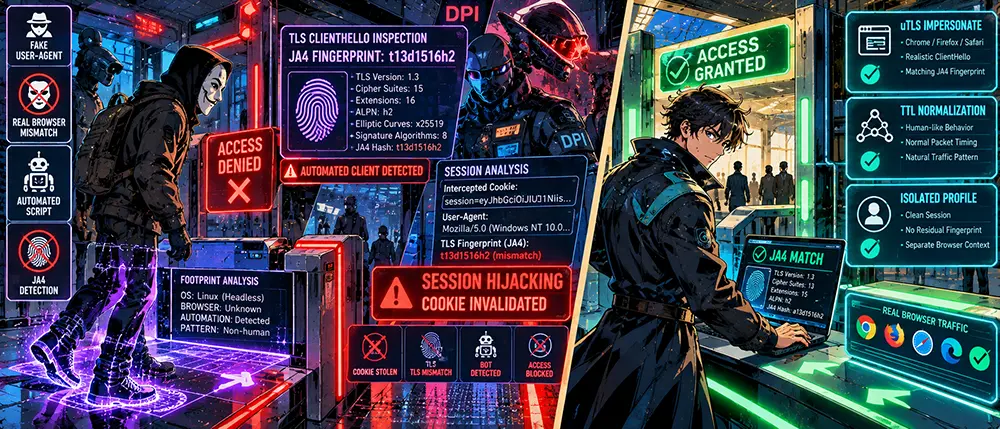
You slip into a flawless latex suit, stretch a silicone stranger's mask over your face, climb into an unmarked rental car, and pull up to an exclusive private club. You are confident you are completely unrecognizable. You don't even open your mouth or pull out your passport. But waiting at the entrance is a bouncer who isn't even looking at your face.
He's watching how you approached the threshold.
Which foot you took your first step with, what microsecond delay you used to drop your heel onto the granite, at what angle you hold your shoulders, and in what order you unbutton your coat. For every human being, this motor skill is as unique as a retinal scan. The bouncer makes a note on his tablet: "That's the same guy from the private sector on the outskirts who came in here yesterday wearing a black jacket." Your mask and fake license plates are headed for the scrap heap. You were figured out before you even said hello.
This is exactly how JA4 fingerprinting works. Most users naively believe that a clean IP address on a fresh VPN server hides their identity. In reality, your browser or custom script gives you away at step zero of the cryptographic handshake, long before the encrypted tunnel has even managed to come up.
Stop. If you seriously think that Incognito mode and a user-agent changer in a Chrome extension make you invisible to Cloudflare or Akamai, close this page. Go back to the forums to discuss free proxy lists.
But if you've ever torn down raw dumps in Wireshark, seen extension bytes in TLS ClientHello, and want to understand why anti-fraud systems flag your software by a mundane cipher suite sort order—welcome to the network fingerprint dissection lab.
The Evolution of Surveillance: Why Legacy JA3 Lost Ground and How JA4 Works
For five years, the network control industry lived on JA3 signatures. The principle was simple: five core parameters from the TLS ClientHello packet (TLS version, list of supported Cipher Suites, list of Extensions, Elliptic Curves, and point formats) were concatenated with commas and hashed into a familiar MD5 string.
Yet JA3 had a fatal flaw: it was a blind hash. You couldn't quickly tell what kind of client you were dealing with without querying a giant lookup database. If a library changed the order of two ciphers, the entire hash broke.
The JA4 specification turned passive analysis into a modular scalpel. It is now a 36-character structured string formatted as:
Plaintext
[Protocol][Cipher Count][Extension Count][ALPN]_[Cipher Hash]_[Extension Hash]
Example of a real fingerprint: t13d1516h2_8daaf6152771_027142270908
Let's dissect the anatomy of this string:
- Section
t13d1516h2(Network Passport):
t— transport protocol (TCP). If traffic runs over QUIC, the first letter becomesq.
13— maximum supported TLS version (TLS 1.3).
d— presence of SNI indicator (destination domain transmitted in plaintext).
15— exact count of cipher suites offered by the client.
16— exact count of transmitted TLS extensions.
h2— application-layer protocol from the ALPN (Application-Layer Protocol Negotiation) field, e.g., HTTP/2.
- Section
8daaf6152771(Cipher Hash):
- A truncated 12-character SHA-256 hash of the sorted list of all supported encryption algorithms. Unlike JA3, ciphers are forcibly sorted here by hexadecimal value, eliminating accidental mutations.
- Section
027142270908(Extensions and Signatures Hash):
- Hash of the extension list combined with the list of supported digital signature algorithms (Signature Algorithms).
As a result, CDN defense systems (Cloudflare, Fastly, AWS CloudFront) receive an immediate snapshot: if the User-Agent header claims the request was sent from macOS Safari, but the extension structure and signature ordering produce a curl or standard Python requests module fingerprint, the connection is flagged as an automated botnet before the first HTTP GET or POST request is even sent.
How Pass-the-Cookie Works with JA4: The Hijacked Session Trap
Many developers and administrators think: "If an attacker stole my session cookies or Bearer token, the game is over." That's true for legacy web servers. But modern enterprise systems build their defenses on Layer 4/Layer 7 binding.
The Pass-the-Cookie attack relies on injecting stolen, valid session identifiers (session_id, cf_clearance, authorization tokens) into the attacker's browser.
The trap workflow looks like this:
[Victim: Chrome / Windows]  ──> TLS Handshake: JA4 = t13d1516h2_abc...  ──> Session Issued
                                                                                │
[Cookie Theft via Infostealer]                                                  │
                                                                                ▼
[Attacker: Python / Headless] ──> TLS Handshake: JA4 = t13i040800_fff... ──> [CDN Check]
                                  Injects valid session_id                  (MISMATCH!)
                                                                                │
                                                                                ▼
                                                                     [Session Reset + Ban]
- The victim logs into a corporate portal from a real laptop. The security system records: session
ID_98745is valid only when bound to fingerprintt13d1516h2_8daaf6152771_027142270908.
- An infostealer or malicious extension leaks the cookies. The attacker launches an automation script (Playwright, Puppeteer, Selenium, or a pure Go script) and sends a request with the valid session cookie.
- The edge gateway sees: the cookie is legitimate, but the incoming
ClientHellopacket features the fingerprint of the standardlibcurllibrary or a custom Node.js TLS stack.
- The Session Hijacking Alert heuristic triggers. The session is invalidated on the backend, and the attacker's IP address is added to reputation blocklists.
Metadata Correlation: Deanonymization Across VPN Tunnels
If you use a third-party VPN but keep browsing from your regular setup without an isolated environment, you leave behind an unbroken trail.
- Passive Packet Timing Correlation (Packet Size & Padding Fingerprinting).
- Each TLS protocol implementation formats its ClientHello size differently. Chrome appends a special Padding extension (type 21) to pad the packet length out to a specific block size. Firefox does not do this, or uses different coefficients. Consequently, even inside an encrypted WireGuard tunnel, a network operator can see the exact handshake packet size, matching it against a specific node's activity.
- TCP and TLS Stack Desynchronization.
- If the tunnel is hosted on a remote Linux server while the browser headers specify Windows 11, passive analysis of TCP parameters (Window Size, initial TTL, TCP SACK, and MSS options) reveals a mismatch between the real client profile and the operating system kernel.
Engineering Defense Protocol: Fingerprint Alignment and Profile Isolation
Mitigating fingerprinting at the JA4 layer requires full control over the cryptographic stack. Tweaking string settings in your browser is useless—you must manage byte generation at the socket level.
- Using TLS Clients with Fingerprint Spoofing (uTLS).
- If you are writing custom software, bots, or integration modules, forget standard libraries like
net/httpin Go orurllib3in Python. All outbound traffic must be routed through libraries that fully mimic target browser ClientHello handshakes (such asuTLSfor Go orcurl-impersonate):
- Bash
# Build and send a request with byte-for-byte TLS emulation of Chrome 120+
curl-impersonate-chrome -v "https://target-service.com" \
  --header "User-Agent: Mozilla/5.0 (Windows NT 10.0; Win64; x64)..."
- Normalizing TCP Stack Parameters on the Edge Router.
- To prevent a host's network profile from giving away its real OS, outbound traffic through a Linux-based gateway can be normalized using
iptablesand thetcsubsystem:
- Bash
# Pin TTL to eliminate network hop count analysis
iptables -t mangle -A POSTROUTING -o eth0 -j TTL --ttl-set 64

# Protect against TCP MSS size analysis
iptables -t mangle -A POSTROUTING -p tcp --tcp-flags SYN,RST SYN -j TCPMSS --set-mss 1440
- Rigorous Session Container Isolation.
- Never use your daily work browser to access isolated perimeters. Every session requiring confidentiality should live inside a separate anti-detect browser instance (or in a clean virtual machine with a distinct display profile, WebGL renderer, and its own isolated network namespace).
- Resetting Session Tokens on Network Coordinate Shifts.
- Managed web applications should implement strict validation: if a request with an existing session token arrives from a drastically different JA4 hash (e.g., the client's operating system or software class changed), the token must be immediately revoked, forcing hardware-backed re-authentication.
Anonymity in the modern internet is no longer measured in miles to a remote server or the number of nodes in a proxy chain. The network has learned to see the geometry of your program code right through any layers of standard encryption. True privacy doesn't begin with buying someone else's tunnel, but with the methodical rebuilding of every byte your hardware sends out into the open wire.